



THE AI LIBRARY
FREE AI RESOURCES · FROM REAL WORK
30 FREE resources.
 ChatGPT
 Gemini
 Perplexity
 Hugging Face
 Cursor
 GitHub Copilot
 Ollama
 OpenRouter
 Meta AI
The Lead Triage Desk: sort every new enquiry and draft replies you approve
A full Desk spec, prompt and test routine that sorts WhatsApp, form and email enquiries into Hot, Warm, Later and Unclear, drafts safe replies and flags risky ones.
 Claude+2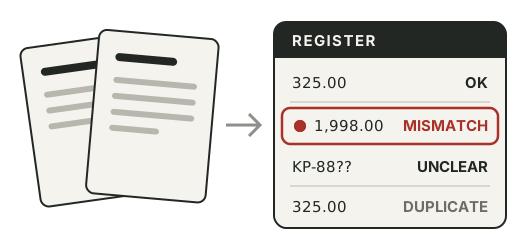
Invoice and agreement intake: log them with AI and catch mistakes before you pay
Three prompts, tested in Claude on sample paperwork, that turn invoices into a checked register and agreements into a key terms sheet with due dates and renewal deadlines.
ClaudeDraft WhatsApp replies in BM or English that you check and send
Build a notes file, a few voice examples and one reusable prompt that turn a customer message into a short reply in their language, using only your real prices.
Claude+2Turn a customer message into a draft quote
Paste a request and your price list, get line items tied to your price list, every assumption, the questions to ask first, and totals checked in a spreadsheet.
Claude+2Put your price list in a shape AI can read correctly
Turn prices scattered across your head, PDFs and chats into one plain-text list with clear units, inclusions and needs-owner-price rules, then quiz the AI on it.
Follow-ups that stop when they should
A Follow-up Desk for sent quotes: a simple list, a plan with a clear end, stop rules, a bank of useful things to share, and prompts that draft one message at a time.
Claude+2Before you paste anything into AI: a two-minute safety check
Set up a two-minute check for anything going into ChatGPT, Claude or Gemini: what to remove, a green-amber-red job sort, tool privacy settings and a team card.
Check the AI's answer before a customer sees it
A review habit for AI drafts: named reviewers, drafts that show their sources, six questions, three honest labels and a log that turns mistakes into better rules.
The five things AI should never do without you
A one-page rules file that keeps money, customer messages, deletions, public posts and account changes in human hands, plus approval cards, settings checks and tests.
A weekly business report you check instead of write
Set up a Report Desk that fills the same short report every Monday from your files, traces every number to a file and column, and flags stale or missing data.
Claude+2Sort a pile of receipts into a clean expense table
Turn receipt photos, PDFs or pasted text into one expense table in your accountant's categories, with UNREADABLE instead of guesses and totals done by formulas.
Claude+2Turn a rambling voice note into a step-by-step SOP
Record yourself explaining a job, get a transcript, and turn it into a numbered SOP with checks, mistakes and open questions, then test it on a real staff member.
Claude+2A month of Google Business Profile posts from jobs you really did
Turn short notes about real finished jobs into four honest Google Business Profile posts a month, following Google's post rules, checked and published by you.
Claude+2See what people and search engines find on your website with PLUTO
Scan your site with PLUTO, the checker I built and run, understand its six checks in plain words, then make one fix at a time with AI drafts and a change log.
Kira Dulu: calculators for everyday Malaysian money questions
Kira Dulu is the free calculator site I built for Malaysian money questions. Use it with official numbers and AI-drafted questions before any loan meeting.
Set up a Claude Project as your business brain
Build one Claude Project, or a ChatGPT Project or Gemini Gem, that holds your business facts and rules as files, with instructions and a test set that proves it works.
Claude+2Write your first Claude Skill for quotes or enquiry replies
Package a job you repeat, such as quoting, as a Claude Skill: a SKILL.md with a sharp description, reference files, examples and three tests, per Anthropic's docs.
ClaudeConnect Claude to Gmail, Drive and Calendar safely
Connect Claude to Google Workspace through the official connectors with least privilege, read-only tests first, approval rules for every action and a monthly review.
Claude+2Questions
Is it really free?
Yes. Every resource here is free to read, copy and download. No sign-up is needed. The newsletter is optional.
Do I need Claude, or will ChatGPT work?
The business resources work in any AI chat: Claude, ChatGPT or Gemini. Builder resources say which tools they were built with.
Is it safe to paste my customers' messages?
Remove names, numbers and private details first. The two-minute safety check in the library shows exactly what to take out, and when not to paste at all.
Where do these come from?
The business resources are free starter versions of the Desks taught in the DAINER.AI Academy. The builder resources come from things I actually built for this site and my products.
I want help setting this up for my business.
That is what the Academy is for. Start with the ten-minute lesson, or send an enquiry and tell me what keeps coming back in your week.
LETTERS FROM MY DESK