



 Claude
What you will build
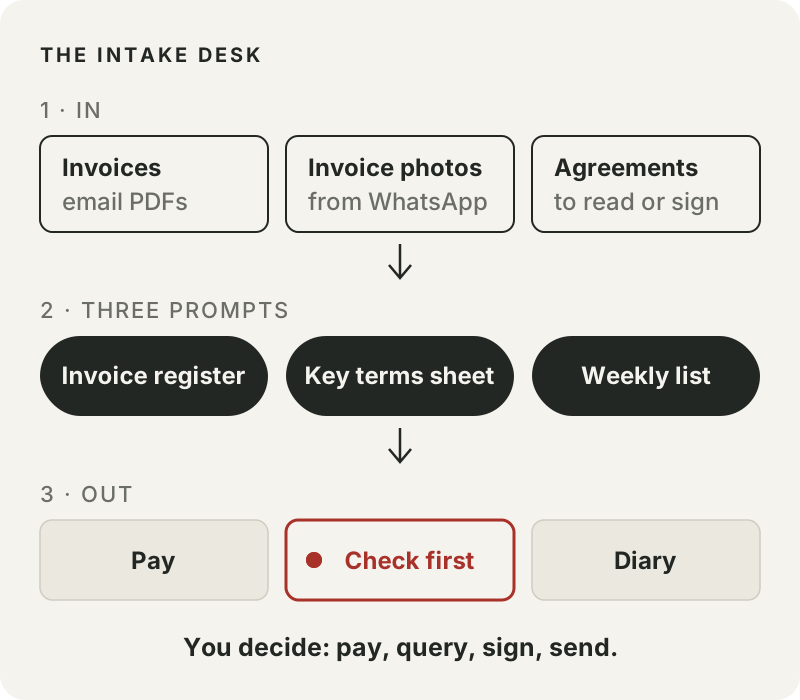
An Intake Desk for the two kinds of paperwork that decide where your money goes: supplier invoices and service agreements.
Once a week you upload or paste what came in, run three prompts, and get:
- an invoice register you can paste into a spreadsheet, with due dates worked out and every total checked against its line items
- a key terms sheet for each agreement, with the last day to stop a renewal already counted
- a short list for the week: what to pay, what to query first, and what goes in your diary
The AI reads and flags. You pay, query, sign and send.
Why bother with a routine
Picture an ordinary week at a small shop. Two invoices arrive by email. A staff member forwards a photo of a third on WhatsApp, then forwards the first one again because they were not sure you got it. On Monday a cleaning company sends a one-year service agreement, dated for signing on Friday.
None of this is hard. It is just easy to get slightly wrong: paying the same invoice twice, paying a total nobody checked, or missing the one date in a contract that lets you stop it renewing for another year.
That shop is made up, and so are all the documents in this guide. We wrote them to include exactly those mistakes, typed them out as text (with a note where a real photo would be smudged), ran the prompts on them, and copied the key parts of the results below word for word.
Before you start
- Claude, ChatGPT or Gemini.
- What we tested: these prompts, in a fresh Claude (Sonnet) session on 23 September 2026, using pasted text. They are plain text and should work in ChatGPT and Gemini too, but we have not tested those, so do the practice round first and compare your results with ours.
- This week's invoices, and any agreement you need to read. You can paste text or upload PDFs and photos. With an upload there is one more thing to check: whether the AI read the print correctly. That is what the WHERE I READ IT quotes are for. Start with five to ten invoices.
- A spreadsheet: Google Sheets or Excel.
- About 45 minutes for the first run, including the practice round.
Your first action: open a new chat, paste the invoice prompt from Step 2, and replace the line in square brackets under INVOICES with invoice-1 to invoice-4 from the practice round at the end of this guide. Compare what comes back with our table in Step 2. Then do the same with your own paperwork.
How it works
The prompt packs we looked at ask the AI to write an invoice or to "review" a contract. This Desk does something smaller and safer. In our test, AI did that smaller job well: reading each document and pulling the same fields into the same table. It should not be the one making the final call on money or contracts.
So every prompt follows three rules:
- Show where you read it. For the figures you act on (the invoice number, the due date or terms, the total, and every answer about an agreement), the AI quotes the exact words on the document. When something looks off, you can find it on the original in seconds.
- UNCLEAR, never a guess. If a field is smudged or missing, the AI says so instead of filling the gap.
- Flag, do not fix. When the maths does not add up, the AI marks MISMATCH and tells you what to query. It does not quietly correct the supplier's figure.
The routine uses three prompts:
- Invoice prompt: every invoice becomes one checked row in your register.
- Agreement prompt: each agreement becomes a key terms sheet with the dates you must act on.
- Weekly list: the register and the dates become this week's pay, check and diary list.
Step 1: Put the week's paperwork in one place
Make one folder for the week. Save the email PDFs into it, along with any invoice photos staff sent on WhatsApp. Give each file a short name you will recognise, such as techcare-sep.pdf or kopi-pagi-photo.jpg. That name is how you get from a row in the register back to the original.
For photos: lay the page flat, use good light, and get the whole page in frame. A blurry total should come back as UNCLEAR, which means an extra trip back to the paper. We did not test photos, and an AI can also misread a blurry number without saying so. That is why you check the WHERE I READ IT quotes against the photo.
Check
- Every document for the week is in one folder.
- Each file has a name you will recognise.
- Bank account and IC numbers are covered.
Step 2: Run the invoice prompt
Open a new chat and paste this prompt. Under INVOICES, upload the files or paste their text, and give each one a name.
You are helping me log supplier invoices into a register. Read every invoice below and give me one row per invoice.

Columns:
file | supplier | invoice_no | invoice_date | due_date | due_date_source | subtotal | tax | total | line_items_sum | maths_check

Rules:
- Dates on these invoices are Malaysian style (day first). Write every date as YYYY-MM-DD.
- Copy amounts exactly as printed, but as plain numbers without commas (1850.00, not 1,850.00). Do not round.
- If the invoice prints a due date, use it and write "printed" in due_date_source. If it only gives terms such as "14 days", count from the invoice date and write "calculated: 14 days".
- line_items_sum: add up the line amounts.
- maths_check: write OK only if line_items_sum equals the printed subtotal (or the total when there is no subtotal) and, when a tax line is printed, subtotal + tax equals the total. Otherwise write MISMATCH.
- If the invoice simply has no subtotal or tax line, write NONE in that column.
- Write UNCLEAR only when something is printed but you cannot read it, or when the invoice number, date or total is missing. Do not guess.
- file: the name or label I gave the invoice.

Return the table as CSV so I can paste it into a spreadsheet.

After the table, add three short lists:
1. CHECK BEFORE PAYING: one line for every MISMATCH or UNCLEAR, saying exactly what does not match or cannot be read.
2. POSSIBLE DUPLICATES: invoices with the same supplier and invoice number, or the same supplier, date and total.
3. WHERE I READ IT: for each invoice, quote the exact words you used for the invoice number, the due date (or terms) and the total.

INVOICES:
[paste the invoice text, or upload the photos or PDFs, and give each one a name]
CSV is a plain table format. Your spreadsheet can paste it straight into rows and columns.
What came back in our test
We gave it four made-up invoices: a printing job, an IT support bill with a mistake in its subtotal, a coffee supplier's invoice with a note saying two digits of its number are smudged, and the printing invoice again, as staff forwarded it on WhatsApp. All four were typed out as text.
This is the table exactly as it came back:
file,supplier,invoice_no,invoice_date,due_date,due_date_source,subtotal,tax,total,line_items_sum,maths_check
invoice-1,SYARIKAT CETAK BINTANG,CB-2026-0412,2026-09-02,2026-09-16,printed,325.00,NONE,325.00,325.00,OK
invoice-2,TECHCARE SOLUTIONS SDN BHD,TC/INV/0917,2026-09-10,2026-09-24,calculated: 14 days,1850.00,148.00,1998.00,1580.00,MISMATCH
invoice-3,KOPI PAGI SUPPLIES,UNCLEAR,2026-09-15,2026-10-15,calculated: 30 days,NONE,NONE,553.00,553.00,OK
invoice-4,SYARIKAT CETAK BINTANG,CB-2026-0412,2026-09-02,2026-09-16,printed,NONE,NONE,325.00,325.00,OK
Under the table it listed:
1. CHECK BEFORE PAYING
- invoice-2 (TechCare Solutions, TC/INV/0917): the three line items add up to 1580.00, but the printed subtotal is 1,850.00 — a 270.00 gap. (The 8% tax and final total are internally consistent with the printed subtotal, so the subtotal itself is the figure to query before paying.)
- invoice-3 (Kopi Pagi Supplies): the invoice number is partly smudged ("KP-88", last two digits unreadable) — confirm the full number with the supplier before recording or paying.

2. POSSIBLE DUPLICATES
- invoice-1 and invoice-4: same supplier (Syarikat Cetak Bintang), same invoice number (CB-2026-0412), same date (02/09/2026), and same total (325.00). Looks like the same invoice arrived twice — once by email, once forwarded on WhatsApp. Pay only once.

3. WHERE I READ IT
- invoice-1: invoice number "Invoice No: CB-2026-0412"; due date "Due Date: 16/09/2026"; total "Total 325.00"
- invoice-2: invoice number "Invoice No: TC/INV/0917"; terms "Terms: 14 days"; total "Total payable 1,998.00"
- invoice-3: invoice number "Invoice #: KP-88[smudged, last two digits unreadable]"; terms "Payment due: 30 days"; total "TOTAL RM 553.00"
- invoice-4: invoice number "Invoice No: CB-2026-0412"; due date "Due Date: 16/09/2026"; total "Total 325.00"
Three things in that output are worth slowing down for.
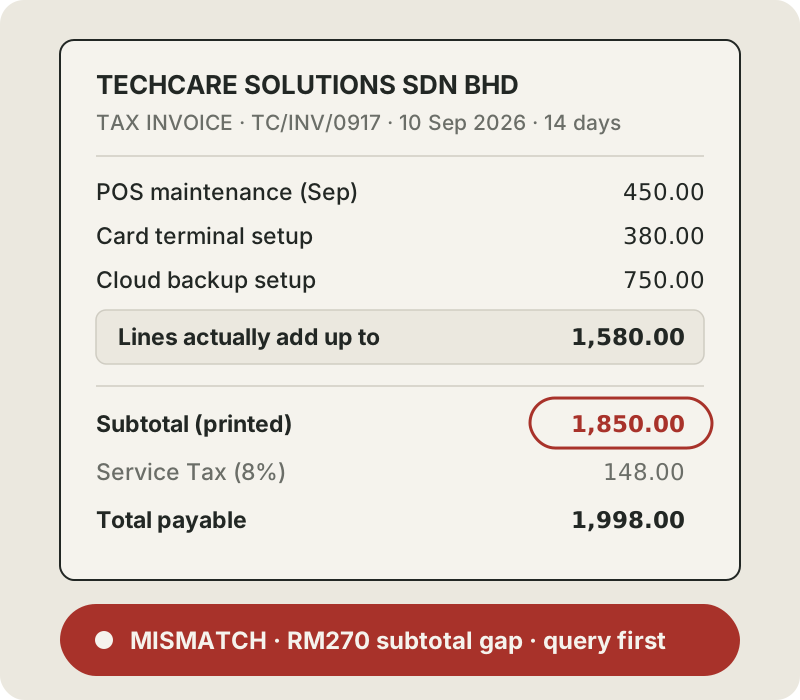
The subtotal error. 450 + 380 + 750 is 1,580. The supplier printed 1,850, then worked out the tax and the total from that figure. If the line items are right, the invoice should be RM1,706.40 (1,580 plus 8% tax), which is RM291.60 less than the RM1,998.00 it asks for. You do not know yet which figure is wrong. That is exactly why it goes to the supplier as a question, not into your bank app as a payment.
The due dates. Two invoices only said "14 days" and "30 days". The AI counted from the invoice date and marked those rows "calculated", so you can tell them apart from dates the supplier actually printed.
The duplicate. Same supplier, same invoice number, same total: one copy by email, one by WhatsApp. Without this check, paying both is an easy mistake.
What we changed after the first run
Our first version of this prompt treated a missing subtotal or tax line the same way as an unreadable one. Two invoices that simply had no subtotal or tax line got extra entries in the "check before paying" list, next to the real problems. A list that raises false alarms teaches you to ignore it, and then it stops protecting you.
So we split the rule. NONE means the invoice has no such line. UNCLEAR means something is printed but cannot be read, or something essential is missing. On the second run only the two real problems were flagged. The prompt above is that second version. We also asked for amounts without commas, so the numbers paste into a spreadsheet cleanly.
Check
- Every invoice has one row, and every row has a file name.
- Everything marked MISMATCH or UNCLEAR appears under CHECK BEFORE PAYING.
- Pick two rows and compare their WHERE I READ IT quotes with the originals. They should match word for word.
Step 3: Keep the register in your spreadsheet
Paste the CSV into a sheet called Invoices. If everything lands in column A, split it: in Google Sheets use Data, then Split text to columns; in Excel use Data, then Text to Columns, choose Delimited and tick Comma. Each week, add the new rows under the last ones, so one sheet becomes your running register. Add two columns of your own at the end: paid_on and notes. When you paste next week's rows, leave out the header row.
Treat line_items_sum and maths_check as a smoke alarm, not a calculator. For every MISMATCH, open the original and add up the lines yourself before you message the supplier. It takes a minute, and it means you are querying the supplier with your own numbers, not the AI's.
Check
- New rows sit under last week's rows, not in a new sheet.
- Every MISMATCH has been added up again by hand.
- Duplicates are marked in notes, not deleted, so you can see what happened later.
- Once a week, spot-check one OK row against its original too.
Step 4: Run the agreement prompt
Use a new chat for each agreement. Fill in your business name, then paste or upload the agreement.
Read the agreement below and fill in this key terms sheet for me, a small business owner.

For every answer, give the clause number and quote the exact words it came from. If the agreement does not say, write NOT IN DOCUMENT. Do not fill gaps from general knowledge.

KEY TERMS
- Who the parties are, and which one is me
- Start date
- End date of the first term
- Does it renew automatically? For how long?
- Notice needed to stop the renewal: how many days, and in what form
- Last day to give that notice (count it and show your working)
- Fees, and how often
- When invoices must be paid
- Late payment charges
- Price increases allowed
- Ending early: who can, from when, and how much notice
- Documents mentioned but not attached

Then add:
DATES TO DIARY: every date I must act on, what to do, soonest first.
QUESTIONS TO ASK BEFORE SIGNING: up to five plain questions about anything missing, one-sided or unclear.

End with this line: "This is a summary to help you read the agreement. It is not legal advice."

I am: [your business name]
AGREEMENT:
[paste the agreement text, or upload the PDF]
What came back in our test
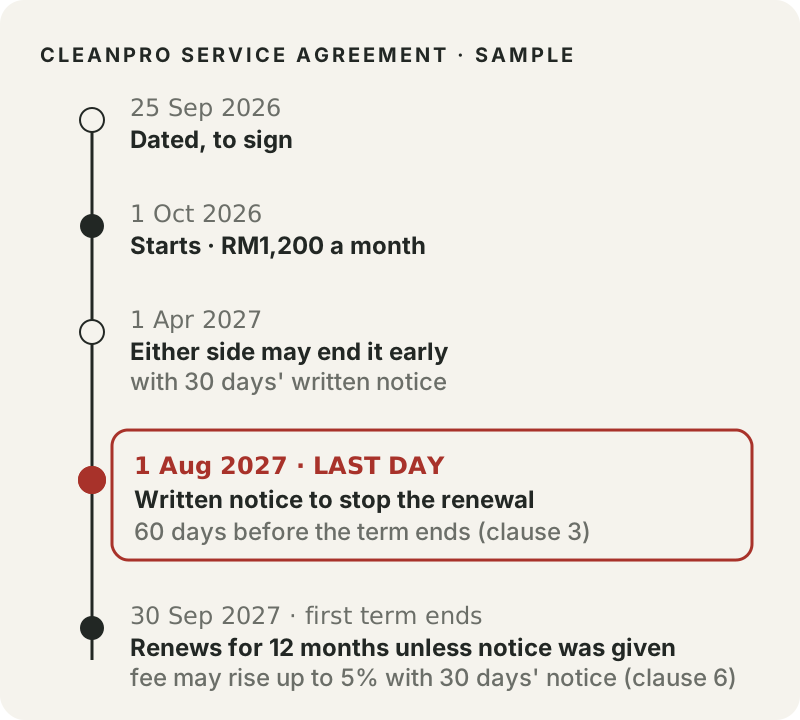
Our sample is a one-year cleaning agreement for a shop, starting 1 October 2026. It renews by itself unless either side gives 60 days' written notice. The most important answer came back like this:
Last day to give that notice — working shown
- First term ends 30 September 2027 (calculated above from Clause 2).
- Clause 3 requires notice "at least sixty (60) days before the end of the then-current term."
- Counting back 60 days from 30 September 2027: back 29 days lands on 1 September 2027; back the remaining 31 days through August (which has 31 days) lands on 1 August 2027.
- Last day to give notice: 1 August 2027. Notice given on or before this date meets the 60-day requirement; any later misses it.
This is the date that costs money if you miss it. Miss it by a day and the agreement renews for another twelve months, and under clause 6 the provider may raise the fee by up to 5% for the new term, with 30 days' written notice. In this sample, clause 7 seems to still let either side end it later with 30 days' written notice. The AI listed both clauses but did not connect them. Many agreements have no such exit, so read the renewal and termination clauses side by side yourself.
The AI also noticed that clause 1 relies on a Schedule A, the actual cleaning schedule, which was not attached. And it wrote five questions to ask before signing. This one is worth asking about almost any agreement, because a deadline only helps if you know how to meet it:
3. The agreement never says how or where "written notice" must be sent (email, registered post, to a named person) — what counts as valid notice here?Check
- Every answer has a clause number and a quote. Treat anything without one as unconfirmed.
- Count the notice deadline again yourself: start from the end date and count back on a calendar. If your count lands on a different day, use the earlier date.
- Check which day of the week the deadline falls on. In our sample, 1 August 2027 is a Sunday, so post the notice the week before.
- Put every date from DATES TO DIARY into your calendar now, with a reminder one week before each.
- Anything under "documents mentioned but not attached": ask for it before you sign.
Step 5: Make the weekly pay, check and diary list
Once a week, open a new chat and paste this prompt. Fill in three things:
- today's date
- the unpaid rows of your register (paid_on is blank), with the header row, leaving out rows you marked as duplicates
- the DATES TO DIARY lines from your agreements
We tested it with the four rows straight from the invoice prompt, not a sheet holding weeks of paid invoices.
Today is [DATE]. Below are my invoice register and my agreement dates.

1. PAY OR CHECK: list invoices that are overdue or due in the next 14 days, soonest first: supplier, invoice_no, due date, total. Put any row marked MISMATCH or UNCLEAR in a separate list called "Check before paying" and say why.
2. AGREEMENT DATES: list agreement dates in the next 60 days and what I need to do.
3. MESSAGES: for each MISMATCH invoice, draft a short, polite WhatsApp message to the supplier asking them to confirm the correct amount. Use only facts from the register. Do not add dates, amounts or promises that are not in it.

I will check everything and send any message myself.

REGISTER:
[paste the CSV table from the invoice prompt]

AGREEMENT DATES:
[paste the DATES TO DIARY list from the agreement prompt]
What came back in our test
We ran it as if today were 23 September 2026:
1. PAY OR CHECK

Overdue or due within the next 14 days (by 7 Oct 2026), soonest first:

- SYARIKAT CETAK BINTANG — invoice CB-2026-0412 — due 2026-09-16 (7 days overdue) — RM325.00

Note: this invoice (CB-2026-0412) appears twice in your register, as identical entries — same supplier, same dates, same total. Worth confirming it's one invoice, not two, before you pay, so you don't pay it twice.

Check before paying:

- TECHCARE SOLUTIONS SDN BHD — invoice TC/INV/0917 — due 2026-09-24 (due tomorrow) — RM1,998.00
  Why: the line items add up to RM1,580.00, but the invoice's subtotal is shown as RM1,850.00 — a RM270.00 gap. (Subtotal + tax does equal the stated total, so the mismatch is specifically between the line items and the subtotal.)

Not due within the next 14 days, but flagging anyway since it's incomplete: KOPI PAGI SUPPLIES, RM553.00, due 2026-10-15 — the invoice number is listed as UNCLEAR in your register. Worth sorting out before it becomes due.

2. AGREEMENT DATES (next 60 days, through 22 Nov 2026)

- Starting October 2026, ongoing every month: pay each invoice within 14 days of its invoice date (Clause 5) to avoid the 1.5%/month late charge. This kicks in with your next invoice cycle.

Your other three agreement dates (1 Apr 2027, 1 Aug 2027, 30 Sep 2027) are all more than 60 days out, so I've left them off this list.

3. MESSAGES

Draft for the one MISMATCH invoice (TechCare):

Hi TechCare team, hope you're doing well. For invoice TC/INV/0917 dated 10 Sep 2026 (due 24 Sep 2026), our records show the line items total RM1,580.00, but the invoice subtotal is showing as RM1,850.00 (total RM1,998.00 with tax). Could you please confirm the correct amount before we process payment? Thanks so much!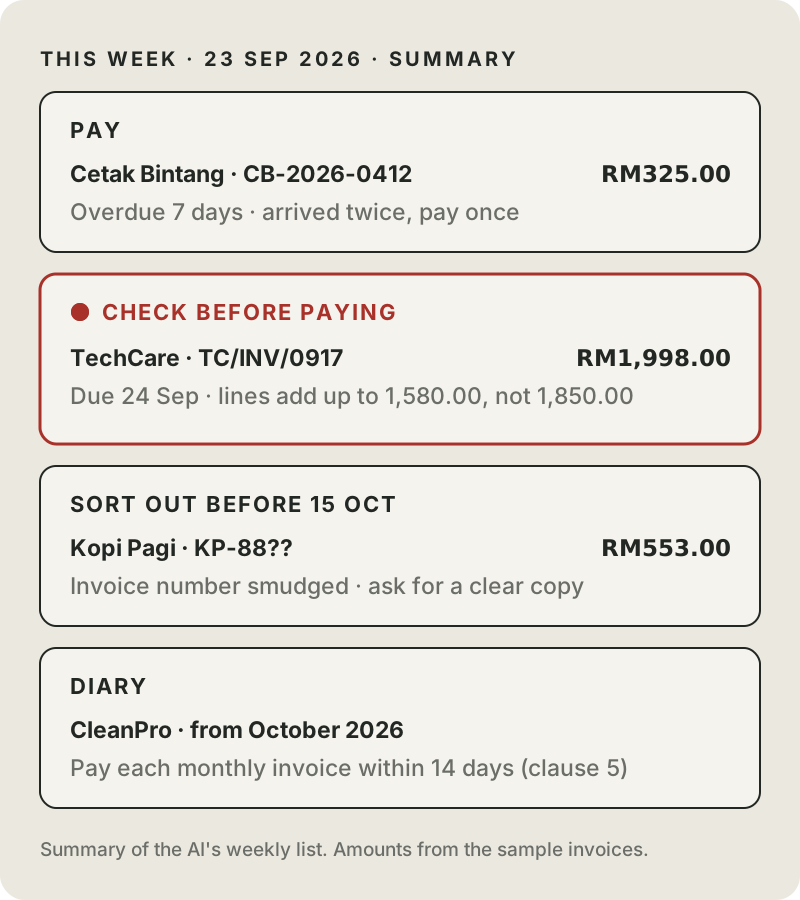
Look at what happened to the TechCare invoice. It is due tomorrow, but it did not go on the pay list. It went under "check before paying" with the reason, and the draft message asks the supplier to confirm the amount using only facts from your register. You read the draft, adjust the tone if you like, and send it yourself.
Check
- Nothing marked MISMATCH or UNCLEAR is on the pay list.
- The draft message has no amount, date or promise that is not in your register.
- Anything listed as a duplicate gets paid once.
What stays with you
- Paying. The list shows what looks ready. You decide, and you pay.
- Messages to suppliers. The AI drafts. You read and send.
- Signing. The key terms sheet is a reading aid. Large or unusual agreements still go to someone qualified.
- Tax and accounts. This routine records what the invoice says. Your accountant decides what it means for your books.
When it goes wrong
- A total comes back UNCLEAR. Retake the photo flat, in better light, or type the total in yourself.
- Day and month look swapped. Check the prompt still says "Malaysian style (day first)". 02/09/2026 is 2 September.
- The AI corrects a supplier's number instead of flagging it. Reply: "Copy amounts exactly as printed. Flag, do not fix."
- The AI answers a contract question without a quote. Ask: "Which clause says that? Quote it." If it cannot, treat the answer as unconfirmed.
- Amounts come back with commas or in quotes. Our first run did this. Reply: "Plain numbers, no commas."
- A long agreement comes back thin. Split it. Run the prompt on the first half of the clauses, then the rest, in the same chat.
- An invoice is in another currency. Add a currency column and keep those rows out of your ringgit totals.
Make it a weekly habit
Pick one slot, say Friday after lunch. Keep one folder per week, the three prompts in a note you can copy from, and the register open next to the chat. Do the practice round below once so you know what good output looks like, then switch to your own paperwork.
If you change a prompt, run the practice round again and check that its five expected results still come back.
Where these prompts come from
The structure, a role plus your details in placeholders plus a fixed output format, is borrowed from God of Prompt's business prompt library. We rewrote the prompts and changed what they ask for: the documents themselves, a quote for the key figures, UNCLEAR instead of guesses, and a maths check. Then we tested them on the documents below.
Practice round: sample documents
These documents are made up, and so are the businesses. Any match with a real business name is a coincidence. Paste invoice-1 to invoice-4 into the invoice prompt, and the agreement into the agreement prompt with Kedai Runcit Harmoni as your business name. For the weekly list, use 23 September 2026 as today's date.
Your wording will differ from ours. What should match: the 270.00 gap on TechCare, the smudged Kopi Pagi number, the Cetak Bintang duplicate, due dates of 2026-09-24 and 2026-10-15, and 1 August 2027 as the last day to stop the renewal. If one is missing, check you pasted the whole prompt, then run it again in a new chat.
Invoices
--- invoice-1 (PDF from email) ---
SYARIKAT CETAK BINTANG
No. 12, Jalan Contoh 3, 47301 Petaling Jaya, Selangor
INVOICE
Invoice No: CB-2026-0412
Invoice Date: 02/09/2026
Due Date: 16/09/2026
Bill To: Kedai Runcit Harmoni

Description                      Qty   Unit Price (RM)   Amount (RM)
A5 flyers, full colour           2000        0.12           240.00
Price tags, 50 per pack             4       15.00            60.00
Delivery                            1       25.00            25.00
                                             Subtotal        325.00
                                             Total           325.00
Payment by bank transfer. Please quote the invoice number.

--- invoice-2 (PDF from email) ---
TECHCARE SOLUTIONS SDN BHD
TAX INVOICE
Invoice No: TC/INV/0917
Date: 10 September 2026
Terms: 14 days
To: Kedai Runcit Harmoni

1. Monthly POS system maintenance (September)   1 x 450.00   450.00
2. On-site visit, card terminal setup            1 x 380.00   380.00
3. Cloud backup setup for sales records          1 x 750.00   750.00
                                         Subtotal         1,850.00
                                         Service Tax (8%)   148.00
                                         Total payable    1,998.00

--- invoice-3 (phone photo) ---
KOPI PAGI SUPPLIES
Invoice #: KP-88[smudged, last two digits unreadable]
Date: 15.09.2026
Arabica beans 1kg      x 6  @ 68.00   = 408.00
Paper cups 12oz (1000) x 1  @ 145.00  = 145.00
TOTAL RM 553.00
Payment due: 30 days

--- invoice-4 (WhatsApp photo from staff) ---
[Photo forwarded on WhatsApp]
SYARIKAT CETAK BINTANG
INVOICE
Invoice No: CB-2026-0412
Invoice Date: 02/09/2026
Due Date: 16/09/2026
Bill To: Kedai Runcit Harmoni
A5 flyers, full colour     2000 x 0.12    240.00
Price tags, 50 per pack       4 x 15.00    60.00
Delivery                      1 x 25.00    25.00
Total                                     325.00
Agreement
SERVICE AGREEMENT

This Agreement is made on 25 September 2026 between:
(1) KEDAI RUNCIT HARMONI ("the Client"); and
(2) CLEANPRO SERVICES ("the Provider").

1. Services. The Provider will clean the Client's shop premises three times a week, as set out in Schedule A.
2. Term. This Agreement starts on 1 October 2026 and continues for twelve (12) months.
3. Renewal. At the end of the Term, this Agreement renews automatically for a further twelve (12) months unless either party gives written notice of non-renewal at least sixty (60) days before the end of the then-current term.
4. Fees. The Client will pay RM1,200 per month. The Provider will invoice on the first working day of each month.
5. Payment. Invoices are payable within fourteen (14) days of the invoice date. Late payments carry a charge of 1.5% per month on the overdue amount.
6. Price review. On each renewal, the Provider may increase the monthly fee by up to 5% by giving the Client thirty (30) days' written notice.
7. Termination. After the first six (6) months, either party may end this Agreement by giving thirty (30) days' written notice.
8. Supplies. The Provider supplies all cleaning materials and equipment.
9. Governing law. This Agreement is governed by the laws of Malaysia.

Signed for the Client: ____________    Signed for the Provider: ____________